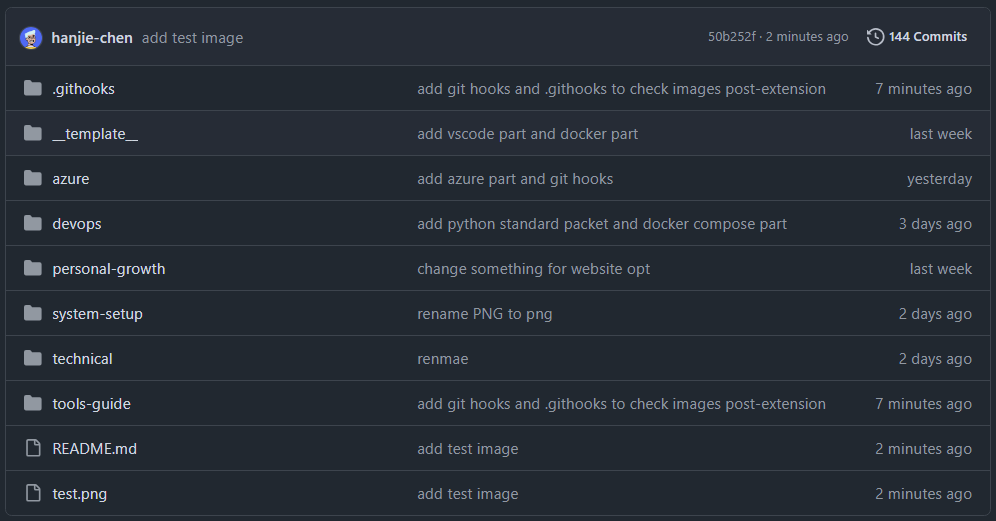
Before we begin
如果遇到这样子一个问题,在 windows 环境中,我们有一个 git repository,其中包含图片,这些图片的后缀名称包含大写和小写,比如说 .PNG, .png
而我们需要将图片大写后缀名从修改为小写的后缀名称,并且以后的每次提交都要保证图片的后缀名称都要小写,我们应该怎么办?
可以想到的是,首先我们需要扫描已经存在的图片文件,然后将大写的后缀名修改为小写的后缀名,然后提交这个修改,git push 到 github 上面
这首先会遇到一个问题,那就是 windows 系统中文件名称大小写是不敏感的,不过 git 倒是存在解决方案,那就是专门在 git repository 中 启用大小写敏感
但是我们如何保证以后的提交的图片都要小写呢?我们可以尝试使用 git hooks 自动触发我们自己写的脚本
Git Hooks
Git Hooks 是 Git 中的脚本机制,允许您在 Git 仓库中某些事件发生前后自动执行自定义脚本。它们可以帮助您自动化工作流程、执行代码质量检查、强制执行提交规范等。
Git Hooks 分为两类:
- Client-side Hooks:在本地仓库中执行,响应诸如提交、合并、推送等操作。常用于代码格式化、代码检查、提交信息验证等。
- Server-side Hooks:在远程仓库(服务器)上执行,响应诸如接收推送、更新引用等操作。常用于强制执行提交策略、触发持续集成等。
Note
server-side hooks:
如果您管理自己的 Git 服务器,可以使用服务器端钩子来强制执行更严格的策略。例如,禁止提交包含特定关键字的代码,或在接收到推送后自动部署代码
注意:如果您使用的是托管的 Git 平台(如 GitHub、GitLab 等),通常无法自定义服务器端钩子。但这些平台提供了 Webhooks、CI/CD 集成等功能,可以达到类似的目的。
./git/hooks dir
Git Hooks 存储在每个仓库的 .git/hooks 目录中。默认情况下,这个目录包含一些示例脚本,以 .sample 结尾
 1
 2
 3
 4
 5
 6
 7
 8
 9
10
11
12
13
14
15
16
17
18
19
20 | PS C:\Users\Plain\PersonalArticles\.git\hooks> ls
Directory: C:\Users\Plain\PersonalArticles\.git\hooks
Mode LastWriteTime Length Name
---- ------------- ------ ----
-a--- 1/8/2025 2:33 AM 478 applypatch-msg.sample
-a--- 1/8/2025 2:33 AM 896 commit-msg.sample
-a--- 1/8/2025 2:33 AM 4726 fsmonitor-watchman.sample
-a--- 1/8/2025 2:33 AM 189 post-update.sample
-a--- 1/8/2025 2:33 AM 424 pre-applypatch.sample
-a--- 1/8/2025 2:33 AM 1649 pre-commit.sample
-a--- 1/8/2025 2:33 AM 416 pre-merge-commit.sample
-a--- 1/8/2025 2:33 AM 1374 pre-push.sample
-a--- 1/8/2025 2:33 AM 4898 pre-rebase.sample
-a--- 1/8/2025 2:33 AM 544 pre-receive.sample
-a--- 1/8/2025 2:33 AM 1492 prepare-commit-msg.sample
-a--- 1/8/2025 2:33 AM 2783 push-to-checkout.sample
-a--- 1/8/2025 2:33 AM 2308 sendemail-validate.sample
-a--- 1/8/2025 2:33 AM 3650 update.sample
|
这些示例脚本都是可供参考的模板。如果您想要启用某个钩子,只需移除 .sample 扩展名,编写自己的脚本,并确保脚本具有可执行权限
在项目中共享 Git Hooks
默认情况下,Git Hooks 不会被添加到版本控制中,即其他克隆该仓库的用户不会自动获得您的钩子脚本。为了解决这个问题,我们可以将钩子脚本存储在仓库中并设置 hooksPath
在仓库中创建一个目录存放钩子脚本
将您的钩子脚本移动到该目录:
| mv .git/hooks/pre-commit .githooks/pre-commit
|
告诉 Git 使用自定义的 hooks 目录:
| git config core.hooksPath .githooks
|
将钩子目录添加到版本控制:
| git add .githooks
git commit -m "Add git hooks"
|
这样一来,其他开发者在克隆仓库后,也会获得钩子脚本。
check image upper case extension
我们使用 pre-commit 钩子,在 git commit 命令之前自动执行脚本,使用 python 因为在我的 windows 和 Linux 环境中都存在 python 环境
主要功能:提交代码之前,自动将暂存区(staging area)中所有扩展名包含大写字母的图片文件的扩展名转换为小写。
pre-commit
1
2
3
4
5
6
7
8
9
10
11
12
13
14
15
16
17
18
19
20
21
22
23
24
25
26
27
28
29
30
31
32
33
34
35
36
37
38
39
40
41
42
43
44
45
46
47
48
49 | #!/usr/bin/env python3
# -*- coding: utf-8 -*-
import os
import sys
import subprocess
def get_staged_files():
"""获取暂存区中的文件列表"""
result = subprocess.run(['git', 'diff', '--cached', '--name-only'], stdout=subprocess.PIPE, text=True)
files = result.stdout.strip().split('\n')
return files
def rename_image_extensions(files):
"""将大写图片后缀名转换为小写"""
image_extensions = ['.PNG', '.JPG', '.JPEG', '.GIF', '.BMP', '.TIFF', '.SVG']
renamed = False
for file in files:
if not os.path.isfile(file):
continue
_, ext = os.path.splitext(file)
if ext.upper() in image_extensions and ext != ext.lower():
new_file = file[:-len(ext)] + ext.lower()
os.rename(file, new_file)
# 更新暂存区的文件
subprocess.run(['git', 'add', new_file])
subprocess.run(['git', 'rm', '--cached', file])
renamed = True
print(f"rename file: {file} -> {new_file}")
return renamed
def main():
files = get_staged_files()
if not files or files == ['']:
sys.exit(0)
renamed = rename_image_extensions(files)
if renamed:
print("image extension name lowercased, staging area updated")
print("please confirm change, and run git commit again to commit")
sys.exit(1) # 终止提交,让用户检查更改
else:
sys.exit(0) # 正常结束,允许提交
if __name__ == '__main__':
main()
|
test
 1
 2
 3
 4
 5
 6
 7
 8
 9
10
11
12
13
14
15
16
17
18
19
20
21
22
23
24
25
26
27
28
29
30
31
32
33
34
35
36
37
38
39
40
41
42
43
44
45
46
47
48
49
50
51
52
53
54
55
56
57
58
59
60
61
62
63
64
65
66
67
68
69
70
71
72
73
74
75
76 | PS C:\Users\Plain\PersonalArticles> touch test.PNG
Created new file: test.PNG
PS C:\Users\Plain\PersonalArticles> ls
Directory: C:\Users\Plain\PersonalArticles
Mode LastWriteTime Length Name
---- ------------- ------ ----
d---- 1/8/2025 2:33 AM __template__
d---- 1/9/2025 6:59 AM .githooks
d---- 1/9/2025 3:46 AM azure
d---- 1/8/2025 2:33 AM devops
d---- 1/8/2025 2:33 AM personal-growth
d---- 1/8/2025 2:33 AM system-setup
d---- 1/8/2025 2:33 AM technical
d---- 1/8/2025 2:33 AM tools-guide
-a--- 1/10/2025 2:26 AM 1189 README.md
-a--- 1/10/2025 2:27 AM 0 test.PNG
PS C:\Users\Plain\PersonalArticles> git status
On branch main
Your branch is up to date with 'origin/main'.
Changes not staged for commit:
(use "git add <file>..." to update what will be committed)
(use "git restore <file>..." to discard changes in working directory)
modified: README.md
Untracked files:
(use "git add <file>..." to include in what will be committed)
test.PNG
no changes added to commit (use "git add" and/or "git commit -a")
PS C:\Users\Plain\PersonalArticles> git add .
PS C:\Users\Plain\PersonalArticles> git status
On branch main
Your branch is up to date with 'origin/main'.
Changes to be committed:
(use "git restore --staged <file>..." to unstage)
modified: README.md
new file: test.PNG
PS C:\Users\Plain\PersonalArticles> git commit -m "add test.PNG fiel to test pre-commit"
rm 'test.PNG'
rename file: test.PNG -> test.png
image extension name lowercased, staging area updated
please confirm change, and run git commit again to commit
PS C:\Users\Plain\PersonalArticles> git status
On branch main
Your branch is up to date with 'origin/main'.
Changes to be committed:
(use "git restore --staged <file>..." to unstage)
modified: README.md
new file: test.png
Changes not staged for commit:
(use "git add <file>..." to update what will be committed)
(use "git restore <file>..." to discard changes in working directory)
modified: tools-guide/git-guide/git-hooks.md
PS C:\Users\Plain\PersonalArticles> git commit -m "add test image"
[main 50b252f] add test image
2 files changed, 2 insertions(+), 2 deletions(-)
create mode 100644 test.png
PS C:\Users\Plain\PersonalArticles> git push
Enumerating objects: 6, done.
Counting objects: 100% (6/6), done.
Delta compression using up to 4 threads
Compressing objects: 100% (3/3), done.
Writing objects: 100% (4/4), 399 bytes | 199.00 KiB/s, done.
Total 4 (delta 2), reused 1 (delta 0), pack-reused 0 (from 0)
remote: Resolving deltas: 100% (2/2), completed with 2 local objects.
To github.com:hanjie-chen/PersonalArticles.git
d29a98c..50b252f main -> main
|
result
代码详解
文件头部:
| #!/usr/bin/env python3
# -*- coding: utf-8 -*-
|
第一行 #!/usr/bin/env python3 是一个 Shebang,用于指定脚本的解释器为 python3。当在 Unix/Linux 系统中直接执行该脚本时,系统会使用指定的解释器来运行脚本。
Note
特别注意,系统必须有 python3 的环境变量,而不是 python 的环境变量,下面的情况就无法运行该脚本
shell
➜ articles git:(main) ✗ python3 --version
➜ articles git:(main) ✗ python --version
Python 3.11.4
会报错,而且没有任何的错误提示
第二行 # -*- coding: utf-8 -*- 指定了脚本文件的编码方式为 UTF-8,这对于正确处理包含非 ASCII 字符的字符串非常重要。
导入必要的模块:
| import os
import sys
import subprocess
|
os 模块提供了与操作系统进行交互的功能,如文件和目录的操作。sys 模块提供了与 Python 解释器进行交互的功能,如退出程序、获取命令行参数等。subprocess 模块允许我们启动新进程,连接它们的输入/输出/错误管道,并获取返回值。
获取暂存区中的文件列表:
| def get_staged_files():
"""获取暂存区中的文件列表"""
result = subprocess.run(['git', 'diff', '--cached', '--name-only'], stdout=subprocess.PIPE, text=True)
files = result.stdout.strip().split('\n')
return files
|
- 使用
subprocess.run 执行 Git 命令 git diff --cached --name-only ,获取暂存区中已更改的文件列表。
stdout=subprocess.PIPE 表示将子进程的标准输出捕获到 result.stdout 中。text=True 表示以字符串形式处理输出数据。- 将输出结果按行分割,得到文件列表
files。
将大写图片扩展名转换为小写:
1
2
3
4
5
6
7
8
9
10
11
12
13
14
15
16
17
18
19 | def rename_image_extensions(files):
"""将大写图片后缀名转换为小写"""
image_extensions = ['.PNG', '.JPG', '.JPEG', '.GIF', '.BMP', '.TIFF', '.SVG']
renamed = False
for file in files:
if not os.path.isfile(file):
continue
_, ext = os.path.splitext(file)
if ext.upper() in image_extensions and ext != ext.lower():
new_file = file[:-len(ext)] + ext.lower()
os.rename(file, new_file)
# 更新暂存区的文件
subprocess.run(['git', 'add', new_file])
subprocess.run(['git', 'rm', '--cached', file])
renamed = True
print(f"rename file: {file} -> {new_file}")
return renamed
|
- 定义了一个包含大写图片扩展名的列表
image_extensions。
- 遍历暂存区的文件列表:
- 使用
os.path.isfile(file) 判断文件是否存在于工作区。
- 使用
os.path.splitext(file) 分离文件名和扩展名。
- 判断条件:
ext.upper() in image_extensions:文件的扩展名(转换为大写)是否在图片扩展名列表中。ext != ext.lower():扩展名是否包含大写字母。
- 如果满足条件:
- 使用
ext.lower() 将扩展名转换为小写,生成新的文件名 new_file。
- 使用
os.rename(file, new_file) 重命名文件。
- 更新 Git 暂存区:
git add new_file:将新文件添加到暂存区。git rm --cached file:将旧文件从暂存区移除(仅移除索引,不删除工作区的文件)。- 设置
renamed = True,表示有文件被重命名。
- 输出重命名信息。
主函数入口:
1
2
3
4
5
6
7
8
9
10
11
12
13
14
15
16 | def main():
files = get_staged_files()
if not files or files == ['']:
sys.exit(0)
renamed = rename_image_extensions(files)
if renamed:
print("image extension name lowercased, staging area updated")
print("please confirm change, and run git commit again to commit")
sys.exit(1) # 终止提交,让用户检查更改
else:
sys.exit(0) # 正常结束,允许提交
if __name__ == '__main__':
main()
|
- 调用
get_staged_files() 获取暂存区中的文件列表。
- 如果暂存区没有文件,程序正常退出(允许提交继续进行)。
- 调用
rename_image_extensions(files) 对文件进行处理。
- 根据
rename 的值决定下一步操作:
- 如果有文件被重命名,输出提示信息,终止提交(
sys.exit(1)),让用户确认更改并重新提交。
- 如果没有文件被重命名,程序正常退出(
sys.exit(0)),允许提交继续进行。