Git Hooks User Guide

Author: Hanjie Chen | Published: 2025-01-11 | Updated: 2026-05-16

cover

Before We Begin

Suppose we run into this problem: in a Windows environment, we have a Git repository that contains images, and the image file extensions include both uppercase and lowercase forms, such as .PNG, .png.

We need to change uppercase image extensions to lowercase extensions, and we also need to make sure every future commit keeps image extensions lowercase. What should we do?

The first idea is to scan the existing image files, rename uppercase extensions to lowercase, commit the change, and push it to GitHub.

This immediately runs into a problem: Windows filenames are case-insensitive. Git does provide a solution for this: enable case sensitivity specifically in the Git repository.

But how can we ensure that image files in future commits always use lowercase extensions? We can try using Git hooks to automatically trigger our own script.

Git Hooks

Git Hooks are Git's script mechanism. They allow you to automatically run custom scripts before or after certain events occur in a Git repository. They can help automate workflows, run code quality checks, enforce commit conventions, and more.

Git Hooks are divided into two categories:

  1. Client-side Hooks: Run in the local repository in response to operations such as commits, merges, and pushes. They are commonly used for code formatting, code linting, commit message validation, and so on.
  2. Server-side Hooks: Run in the remote repository, or server, in response to operations such as receiving pushes and updating references. They are commonly used to enforce commit policies, trigger continuous integration, and so on.

Note

server-side hooks:

If you manage your own Git server, you can use server-side hooks to enforce stricter policies. For example, you can block commits that contain certain keywords, or automatically deploy code after receiving a push.

Note: If you use a hosted Git platform such as GitHub or GitLab, you usually cannot customize server-side hooks. However, these platforms provide Webhooks, CI/CD integrations, and other features that can achieve similar results.

The ./git/hooks Directory

Git Hooks are stored in the .git/hooks directory of each repository. By default, this directory contains some sample scripts ending in .sample.

 1
 2
 3
 4
 5
 6
 7
 8
 9
10
11
12
13
14
15
16
17
18
19
20
PS C:\Users\Plain\PersonalArticles\.git\hooks> ls

    Directory: C:\Users\Plain\PersonalArticles\.git\hooks

Mode                 LastWriteTime         Length Name
----                 -------------         ------ ----
-a---            1/8/2025  2:33 AM            478 applypatch-msg.sample
-a---            1/8/2025  2:33 AM            896 commit-msg.sample
-a---            1/8/2025  2:33 AM           4726 fsmonitor-watchman.sample
-a---            1/8/2025  2:33 AM            189 post-update.sample
-a---            1/8/2025  2:33 AM            424 pre-applypatch.sample
-a---            1/8/2025  2:33 AM           1649 pre-commit.sample
-a---            1/8/2025  2:33 AM            416 pre-merge-commit.sample
-a---            1/8/2025  2:33 AM           1374 pre-push.sample
-a---            1/8/2025  2:33 AM           4898 pre-rebase.sample
-a---            1/8/2025  2:33 AM            544 pre-receive.sample
-a---            1/8/2025  2:33 AM           1492 prepare-commit-msg.sample
-a---            1/8/2025  2:33 AM           2783 push-to-checkout.sample
-a---            1/8/2025  2:33 AM           2308 sendemail-validate.sample
-a---            1/8/2025  2:33 AM           3650 update.sample

These sample scripts are templates for reference. If you want to enable a hook, simply remove the .sample extension, write your own script, and make sure the script has executable permissions.

Sharing Git Hooks in a Project

By default, Git Hooks are not added to version control. In other words, other users who clone the repository will not automatically get your hook scripts. To solve this, we can store the hook scripts in the repository and set hooksPath.

Create a directory in the repository to store hook scripts:

1
mkdir .githooks

Move your hook script into that directory:

1
mv .git/hooks/pre-commit .githooks/pre-commit

Tell Git to use the custom hooks directory:

1
git config core.hooksPath .githooks

Add the hooks directory to version control:

1
2
git add .githooks
git commit -m "Add git hooks"

This way, other developers will also get the hook scripts after cloning the repository.

Check Uppercase Image Extensions

We use the pre-commit hook to automatically run a script before the git commit command. I use Python because both my Windows and Linux environments have Python installed.

Main function: before committing code, automatically convert the extensions of all image files in the staging area whose extensions contain uppercase letters to lowercase.

pre-commit

 1
 2
 3
 4
 5
 6
 7
 8
 9
10
11
12
13
14
15
16
17
18
19
20
21
22
23
24
25
26
27
28
29
30
31
32
33
34
35
36
37
38
39
40
41
42
43
44
45
46
47
48
49
#!/usr/bin/env python3
# -*- coding: utf-8 -*-

import os
import sys
import subprocess

def get_staged_files():
    """获取暂存区中的文件列表"""
    result = subprocess.run(['git', 'diff', '--cached', '--name-only'], stdout=subprocess.PIPE, text=True)
    files = result.stdout.strip().split('\n')
    return files

def rename_image_extensions(files):
    """将大写图片后缀名转换为小写"""
    image_extensions = ['.PNG', '.JPG', '.JPEG', '.GIF', '.BMP', '.TIFF', '.SVG']
    renamed = False

    for file in files:
        if not os.path.isfile(file):
            continue
        _, ext = os.path.splitext(file)
        if ext.upper() in image_extensions and ext != ext.lower():
            new_file = file[:-len(ext)] + ext.lower()
            os.rename(file, new_file)
            # 更新暂存区的文件
            subprocess.run(['git', 'add', new_file])
            subprocess.run(['git', 'rm', '--cached', file])
            renamed = True
            print(f"rename file: {file} -> {new_file}")

    return renamed

def main():
    files = get_staged_files()
    if not files or files == ['']:
        sys.exit(0)

    renamed = rename_image_extensions(files)

    if renamed:
        print("image extension name lowercased, staging area updated")
        print("please confirm change, and run git commit again to commit")
        sys.exit(1)  # 终止提交,让用户检查更改
    else:
        sys.exit(0)  # 正常结束,允许提交

if __name__ == '__main__':
    main()

Test

 1
 2
 3
 4
 5
 6
 7
 8
 9
10
11
12
13
14
15
16
17
18
19
20
21
22
23
24
25
26
27
28
29
30
31
32
33
34
35
36
37
38
39
40
41
42
43
44
45
46
47
48
49
50
51
52
53
54
55
56
57
58
59
60
61
62
63
64
65
66
67
68
69
70
71
72
73
74
75
76
PS C:\Users\Plain\PersonalArticles> touch test.PNG
Created new file: test.PNG
PS C:\Users\Plain\PersonalArticles> ls

    Directory: C:\Users\Plain\PersonalArticles

Mode                 LastWriteTime         Length Name
----                 -------------         ------ ----
d----            1/8/2025  2:33 AM                __template__
d----            1/9/2025  6:59 AM                .githooks
d----            1/9/2025  3:46 AM                azure
d----            1/8/2025  2:33 AM                devops
d----            1/8/2025  2:33 AM                personal-growth
d----            1/8/2025  2:33 AM                system-setup
d----            1/8/2025  2:33 AM                technical
d----            1/8/2025  2:33 AM                tools-guide
-a---           1/10/2025  2:26 AM           1189 README.md
-a---           1/10/2025  2:27 AM              0 test.PNG

PS C:\Users\Plain\PersonalArticles> git status
On branch main
Your branch is up to date with 'origin/main'.

Changes not staged for commit:
  (use "git add <file>..." to update what will be committed)
  (use "git restore <file>..." to discard changes in working directory)
        modified:   README.md

Untracked files:
  (use "git add <file>..." to include in what will be committed)
        test.PNG

no changes added to commit (use "git add" and/or "git commit -a")
PS C:\Users\Plain\PersonalArticles> git add .
PS C:\Users\Plain\PersonalArticles> git status
On branch main
Your branch is up to date with 'origin/main'.

Changes to be committed:
  (use "git restore --staged <file>..." to unstage)
        modified:   README.md
        new file:   test.PNG

PS C:\Users\Plain\PersonalArticles> git commit -m "add test.PNG fiel to test pre-commit"
rm 'test.PNG'
rename file: test.PNG -> test.png
image extension name lowercased, staging area updated
please confirm change, and run git commit again to commit
PS C:\Users\Plain\PersonalArticles> git status
On branch main
Your branch is up to date with 'origin/main'.

Changes to be committed:
  (use "git restore --staged <file>..." to unstage)
        modified:   README.md
        new file:   test.png

Changes not staged for commit:
  (use "git add <file>..." to update what will be committed)
  (use "git restore <file>..." to discard changes in working directory)
        modified:   tools-guide/git-guide/git-hooks.md

PS C:\Users\Plain\PersonalArticles> git commit -m "add test image"
[main 50b252f] add test image
 2 files changed, 2 insertions(+), 2 deletions(-)
 create mode 100644 test.png
PS C:\Users\Plain\PersonalArticles> git push
Enumerating objects: 6, done.
Counting objects: 100% (6/6), done.
Delta compression using up to 4 threads
Compressing objects: 100% (3/3), done.
Writing objects: 100% (4/4), 399 bytes | 199.00 KiB/s, done.
Total 4 (delta 2), reused 1 (delta 0), pack-reused 0 (from 0)
remote: Resolving deltas: 100% (2/2), completed with 2 local objects.
To github.com:hanjie-chen/PersonalArticles.git
   d29a98c..50b252f  main -> main

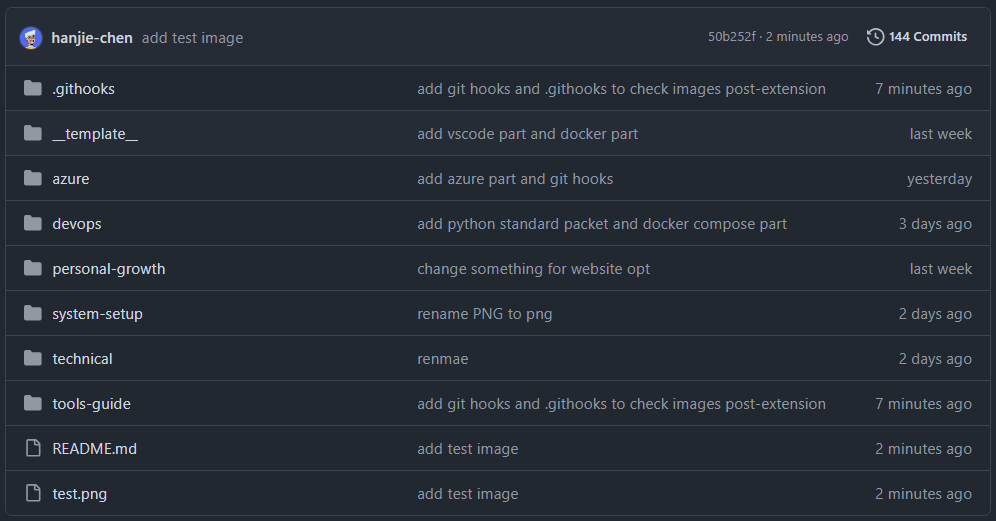
Result

pre-commit success

Code Explanation

File Header:

1
2
#!/usr/bin/env python3
# -*- coding: utf-8 -*-

The first line, #!/usr/bin/env python3, is a Shebang that specifies the script interpreter as python3. When the script is executed directly on a Unix/Linux system, the system uses the specified interpreter to run it.

Note

Pay special attention: the system must have the python3 environment variable, not only the python environment variable. In the following case, the script cannot run:

shell ➜ articles git:(main) ✗ python3 --version ➜ articles git:(main) ✗ python --version Python 3.11.4

It will fail, and there will be no error message.

The second line, # -*- coding: utf-8 -*-, specifies that the script file uses UTF-8 encoding. This is very important for correctly handling strings that contain non-ASCII characters.

Import Required Modules:

1
2
3
import os
import sys
import subprocess
  • The os module provides functions for interacting with the operating system, such as file and directory operations.
  • The sys module provides functions for interacting with the Python interpreter, such as exiting the program and getting command-line arguments.
  • The subprocess module allows us to start new processes, connect to their input/output/error pipes, and get return values.

Get the List of Files in the Staging Area:

1
2
3
4
5
def get_staged_files():
    """获取暂存区中的文件列表"""
    result = subprocess.run(['git', 'diff', '--cached', '--name-only'], stdout=subprocess.PIPE, text=True)
    files = result.stdout.strip().split('\n')
    return files
  • Use subprocess.run to execute the Git command git diff --cached --name-only, which gets the list of changed files in the staging area.
  • stdout=subprocess.PIPE means the child process's standard output is captured in result.stdout.
  • text=True means the output data is handled as a string.
  • Split the output by line to get the file list files.

Convert Uppercase Image Extensions to Lowercase:

 1
 2
 3
 4
 5
 6
 7
 8
 9
10
11
12
13
14
15
16
17
18
19
def rename_image_extensions(files):
    """将大写图片后缀名转换为小写"""
    image_extensions = ['.PNG', '.JPG', '.JPEG', '.GIF', '.BMP', '.TIFF', '.SVG']
    renamed = False

    for file in files:
        if not os.path.isfile(file):
            continue
        _, ext = os.path.splitext(file)
        if ext.upper() in image_extensions and ext != ext.lower():
            new_file = file[:-len(ext)] + ext.lower()
            os.rename(file, new_file)
            # 更新暂存区的文件
            subprocess.run(['git', 'add', new_file])
            subprocess.run(['git', 'rm', '--cached', file])
            renamed = True
            print(f"rename file: {file} -> {new_file}")

    return renamed
  • Define a list image_extensions that contains uppercase image extensions.
  • Iterate through the list of files in the staging area:
  • Use os.path.isfile(file) to check whether the file exists in the working tree.
  • Use os.path.splitext(file) to separate the filename and extension.
  • Conditions:
    • ext.upper() in image_extensions: whether the file extension, after being converted to uppercase, is in the image extension list.
    • ext != ext.lower(): whether the extension contains uppercase letters.
  • If the conditions are met:
    • Use ext.lower() to convert the extension to lowercase and generate the new filename new_file.
    • Use os.rename(file, new_file) to rename the file.
    • Update the Git staging area:
    • git add new_file: add the new file to the staging area.
    • git rm --cached file: remove the old file from the staging area, removing it only from the index without deleting it from the working tree.
    • Set renamed = True, indicating that a file has been renamed.
    • Output the rename information.

Main Function Entry Point:

 1
 2
 3
 4
 5
 6
 7
 8
 9
10
11
12
13
14
15
16
def main():
    files = get_staged_files()
    if not files or files == ['']:
        sys.exit(0)

    renamed = rename_image_extensions(files)

    if renamed:
        print("image extension name lowercased, staging area updated")
        print("please confirm change, and run git commit again to commit")
        sys.exit(1)  # 终止提交,让用户检查更改
    else:
        sys.exit(0)  # 正常结束,允许提交

if __name__ == '__main__':
    main()
  • Call get_staged_files() to get the list of files in the staging area.
  • If there are no staged files, the program exits normally, allowing the commit to continue.
  • Call rename_image_extensions(files) to process the files.
  • Decide what to do next based on the value of renamed:
  • If any files were renamed, output a prompt message and stop the commit with sys.exit(1), allowing the user to confirm the changes and commit again.
  • If no files were renamed, the program exits normally with sys.exit(0), allowing the commit to continue.